




Point of sale checkout with register and receipts

Point of Sale

Checkout that opens and closes on a register

Assign a terminal, open the drawer with opening cash, sell with GST and stock in sync, then print or send the receipt on WhatsApp — and close the register with a cash count.

Counter to close-out

One session, a full audit trail

MercExe POS is not just a cart. Every invoice is tied to a register session so cash, stock, and receipts stay reconcilable.

  1. 01Registers
  2. 02Checkout
  3. 03Payments
  4. 04Inventory
  5. 05Barcode
  6. 06Receipts
  7. 07WhatsApp
  8. 08Close-out

Terminals

Register management

Create registers per facility, assign a device, and run a session from opening cash through close-out. Supervisors can edit, reset, or force-close a stuck register without losing the rest of the store.

  • Registers for Web, Windows, and Android devices
  • Status: Available, Open, Closed, or Force Closed
  • Opening cash required before the first sale of the session
  • Per-register document numbering for invoices and related documents
POS register list with session status and device assignment

Counter

Fast checkout

One POS screen for invoices, credit notes, estimates, orders, and combined invoice-and-return. Add items, change quantity and discount inline, pick a customer or keep walk-in, and hold a draft when the line gets long.

  • Invoice, credit note, estimate, order, and invoice & return in one session
  • Walk-in or registered customer with price list and GST split
  • Hold, resume, clear, and cancel with unsaved-change checks
  • Keyboard shortcuts for operators who prefer not to reach for the mouse
POS checkout with invoices, returns, and held drafts

On the counter

Pay, scan, and keep stock honest

Payments, barcodes, and inventory update in the same sale — including when the terminal is briefly offline.

Cash, card, UPI, and mixed payments at POS

Multi-payment

Collect cash, card, UPI, and other modes on one invoice. Invoice-and-return settles net payable. Credit notes open a refund flow.

  • Split tender across cash, card, UPI, and other
  • Advance and credit-note redemption at payment
  • Session totals by payment mode at close-out
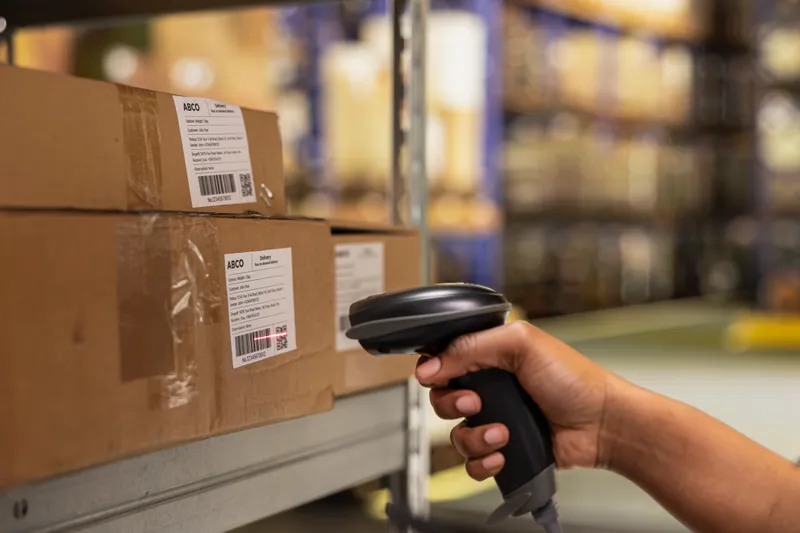
Barcode scanning to add items at checkout

Barcode scanning

Scan SKUs into the cart instead of searching. Line details keep barcode, quantity, UOM, and free quantity so operators can move quickly without losing accuracy.

  • Item search and barcode-backed lines
  • Inline quantity, UOM, free qty, and discount
  • Delete and keyboard navigation on the item table
Inventory updating with every POS sale

Inventory integration

Each sale updates stock from the same inventory the warehouse uses. Work continues on the local replica when the network drops, then syncs when the store is online again.

  • On-hand stock follows the invoice, not a later batch job
  • Offline POS with register session reconstructed locally if needed
  • Same items and prices as the rest of MercExe

Customer copy

Print, email, and WhatsApp receipts

After payment, send the same document the customer expects — a thermal slip, a PDF, an email, or a WhatsApp message with the receipt attached.

Thermal and PDF receipt printing from POS

Print and email

Print to an 80 mm thermal printer over WebUSB, or open a PDF preview. Email sends the PDF as an attachment. Themes cover invoices, estimates, credit notes, and payment receipts.

  • Thermal ESC/POS and branded PDF layouts
  • Print after save so the document number is on the slip
  • Email from print preview when a customer address is on file
WhatsApp receipt sent to the customer phone

WhatsApp receipts

Send the invoice or payment receipt on WhatsApp using your configured templates. The customer phone is normalized, the PDF is attached, and templates stay in Settings so the wording is consistent.

  • Invoice and payment-receipt templates from WhatsApp Configuration
  • Recipient phone from the customer, editable before send
  • Same print preview action as email — no extra export step

End of shift

Close register and sales insight

Close Register walks the operator through drafts still open, completed invoices and refunds, and a cash-drawer count. Expected vs actual cash shows over or short before the session ends.

  • Draft documents listed so nothing is left hanging
  • Cash, card, UPI, and other collected, plus refunds
  • Denomination count or a manual drawer total
  • Sales by customer, item, and day book from Reports
Register close-out with cash count and sales totals

Why MercExe POS

Offline when the line is busy

Keep selling on the local replica. Register session IDs stay on every document so the drawer still ties out when you reconnect.

Hardware you already have

Run on Android tablets, Windows PCs, and browser terminals. Thermal print over WebUSB; barcodes and cash drawers fit the same session.

Receipts customers actually open

Print, email, or WhatsApp the same PDF. Templates live in Settings so stores do not invent a new message every shift.

Cash you can close

Opening cash, payment-mode totals, and drawer count are part of the register — not a notebook next to the till.

See MercExe POS on your counter

Walk through register open, checkout, WhatsApp receipts, and close-out with a product specialist.

Request a demo